

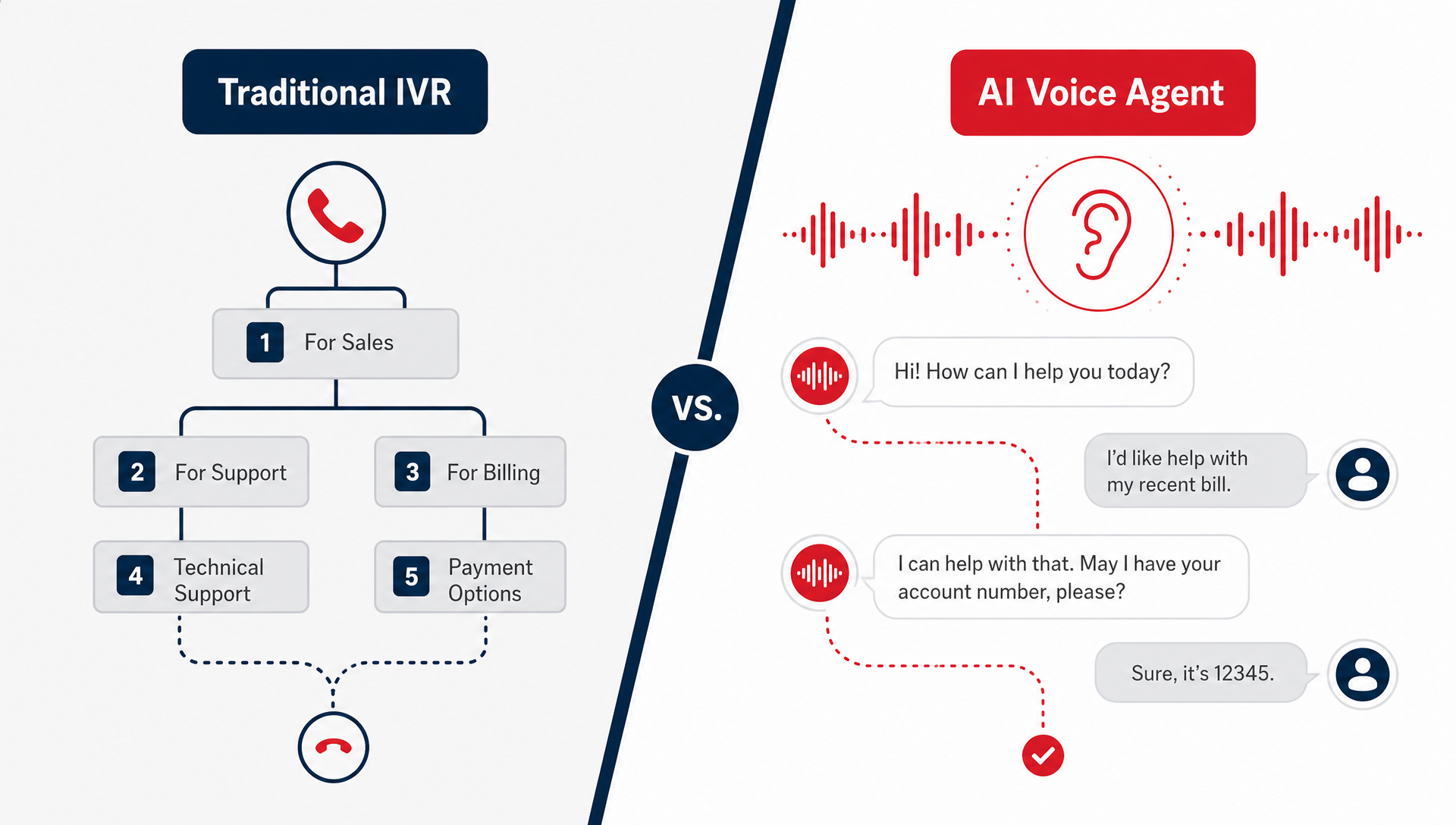
Yes, if the agent is built to listen for context, not just keywords. A good AI voice agent can handle complex customer questions that would make a traditional IVR feel clumsy, but it still needs guardrails, escalation paths, and a clean handoff when the issue really needs a person.
If you run the front desk, support line, or dispatch board, you know the problem. The caller is upset, they have half the story, and they want someone who can keep up without making them repeat everything. A menu tree can only go so far. That is where the gap shows up, one call at a time.
We see this a lot in SMB call flows. The question is not whether a phone tree can route a call. The question is whether it can understand what the caller is trying to do, keep the conversation moving, and get to the right next step without wasting time.
What does an AI voice agent actually do on a call?
An AI voice agent answers the phone, listens to the caller’s intent, and responds in plain language. It can collect details, ask follow-up questions, and route the call when a human needs to take over.
That matters because callers do not think in menu categories. They call with “my order is wrong,” “my appointment needs to move,” or “I need to know if this is covered.” The agent has to sort out what the caller means, not just what keypress they hit.
A traditional IVR is good at one thing, sending calls to a branch, queue, or voicemail box. An AI voice agent can do more, but only if the call flow is designed around real questions instead of a script that sounds smart on paper.
Why IVR breaks down when the issue is messy
Interactive Voice Response (IVR) works best when the caller fits a narrow path. Press 1 for billing, press 2 for service, press 3 for hours. That is fine until the caller needs billing and service, or they do not know which bucket they belong in.
That is where frustration starts. The caller hears options that do not match their problem, repeats themselves, and gets transferred. Every extra transfer adds another chance to lose the call and another chance for staff to start from zero.
In our deployments, the best first-contact systems do two things better than IVR: they ask a useful follow-up question and they know when to hand off. That keeps the call moving without pretending automation can solve every problem.
What does this look like in practice?
Think about a multi-location service shop. A customer calls to ask about a delayed repair, but they also want to know whether the part is in stock and whether the technician is still coming today. A menu tree can route them to a queue. A voice agent can ask for the job number, check the reason for the call, and either answer the common question or escalate it with context attached.
Or think about an urgent care desk after hours. The caller may need directions, scheduling help, or a quick answer about whether the office is open tomorrow. That is not the same as a simple voicemail message. The best system handles the simple parts automatically and hands off anything unclear. For triage or life-safety situations, a human should answer first, AI can handle after-hours informational calls only.
For many teams, the real test is not accuracy in a demo. It is whether the caller feels like the system understood the issue on the first try. If the call is about patient data, keep HIPAA rules in view and make sure the workflow limits what the AI asks, stores, and repeats.
| Question | Traditional IVR | AI voice agent |
|---|---|---|
| Can it understand natural language? | Usually no, or only in a narrow way | Yes, if it is trained for the call flow |
| Can it ask follow-up questions? | Limited | Yes |
| Does it handle messy issues well? | Not usually | Better, with clear guardrails |
| Does it reduce transfers? | Sometimes | Often, when the workflow is designed well |
| Does it need escalation rules? | Yes | Yes, and they matter more |
| Is it a fit for urgent care triage? | Only for basic routing | Only for non-urgent informational calls |
Where TeleCloud fits in
This is the lane where TeleCloud’s AI Receptionist makes sense. It answers calls, handles common questions, collects the basics, and routes people when the conversation gets past the simple stuff.
That matters because you are not trying to eliminate the front desk. You are trying to keep the front desk from getting buried in repetitive calls while still protecting the calls that need a human. TeleCloud’s setup is meant to reduce friction at first contact, not replace judgment. In practice, that means it can answer, qualify, schedule, and hand off with context, so the next person is not starting from scratch.
The context it captures is the part most teams care about on Monday morning: who called, what they needed, what they already tried, and what happened before the handoff. TeleCloud’s Conversational AI Insights can then surface call summaries, repeat questions, and where the conversation stalled, so you can see whether the problem is the IVR, the script, or the team process behind it.
When AI voice agents are a fit, and when they are not
AI voice agents are a good fit when most of your call volume is repetitive, but not trivial. Think scheduling, status checks, hours, intake, basic routing, and common service questions.
They are a weaker fit when every call is a one-off that needs deep judgment from the first second. If the caller needs legal advice, clinical advice, or a detailed exception decision right away, a person should answer sooner.
The safest rule is simple: use AI for the first layer, not the last word. That is where it saves time without creating a bad experience.
How to decide whether to replace IVR
Start with your call log. Look for the top 10 reasons people call, the top 10 transfers, and the top 10 voicemail outcomes. If a few repeat questions are eating up most of the time, you have a good candidate for an AI voice layer.
Then look at what happens after the first answer. If callers still need a person for every meaningful issue, keep the escalation path short. If they mostly need help getting to the right place, AI can take pressure off the queue.
A good test is whether the system saves time without making the caller work harder. If it makes people repeat themselves, it is not helping.
AI voice agents are about cleaner first contact, not magic
The right comparison is not “AI versus humans.” It is “how fast do callers get to the right outcome, with the least friction?” Traditional IVR still has a place in simple routing, but complex calls need something that can listen, respond, and hand off cleanly.
If you want to see whether that fits your call flow, talk with TeleCloud about how AI Receptionist can handle the first layer and keep the edge cases moving. It is a practical way to cut the junk off the front of your phone lines without overpromising what automation can do.
FAQ
Can AI voice agents understand complex customer questions?
Yes, but only within the limits of the conversation design. They do best when the issue has a clear pattern, like scheduling, routing, account lookup, or common service questions.
What is better for call routing, IVR or AI voice agents?
IVR is fine for simple menu-based routing. AI voice agents are better when callers need to explain a problem in normal language and the system has to make sense of that context.
Will an AI receptionist replace my front desk?
No. It should take the repetitive calls off the front desk, not replace the people who handle exceptions, judgment calls, and sensitive conversations.
How do I know if my business needs AI voice agents?
Check whether the same questions keep showing up on inbound calls and whether transfers are creating delays. If callers spend too long bouncing around, an AI layer may be a better first step than adding more menu options.
What should I look for in an AI voice system?
Look for clear escalation rules, useful summaries, and the ability to hand off with context. If it cannot explain what happened on the call, it is not helping your team enough.
Matt Gavin is TeleCloud's Operations Manager, with 15+ years of telecom experience spanning network engineering, billing operations, and AI-driven process automation. He writes about the technology behind reliable phone systems, from VoIP infrastructure to how AI tools are changing day-to-day operations. Connect with Matt on LinkedIn or email him directly to learn more.
