
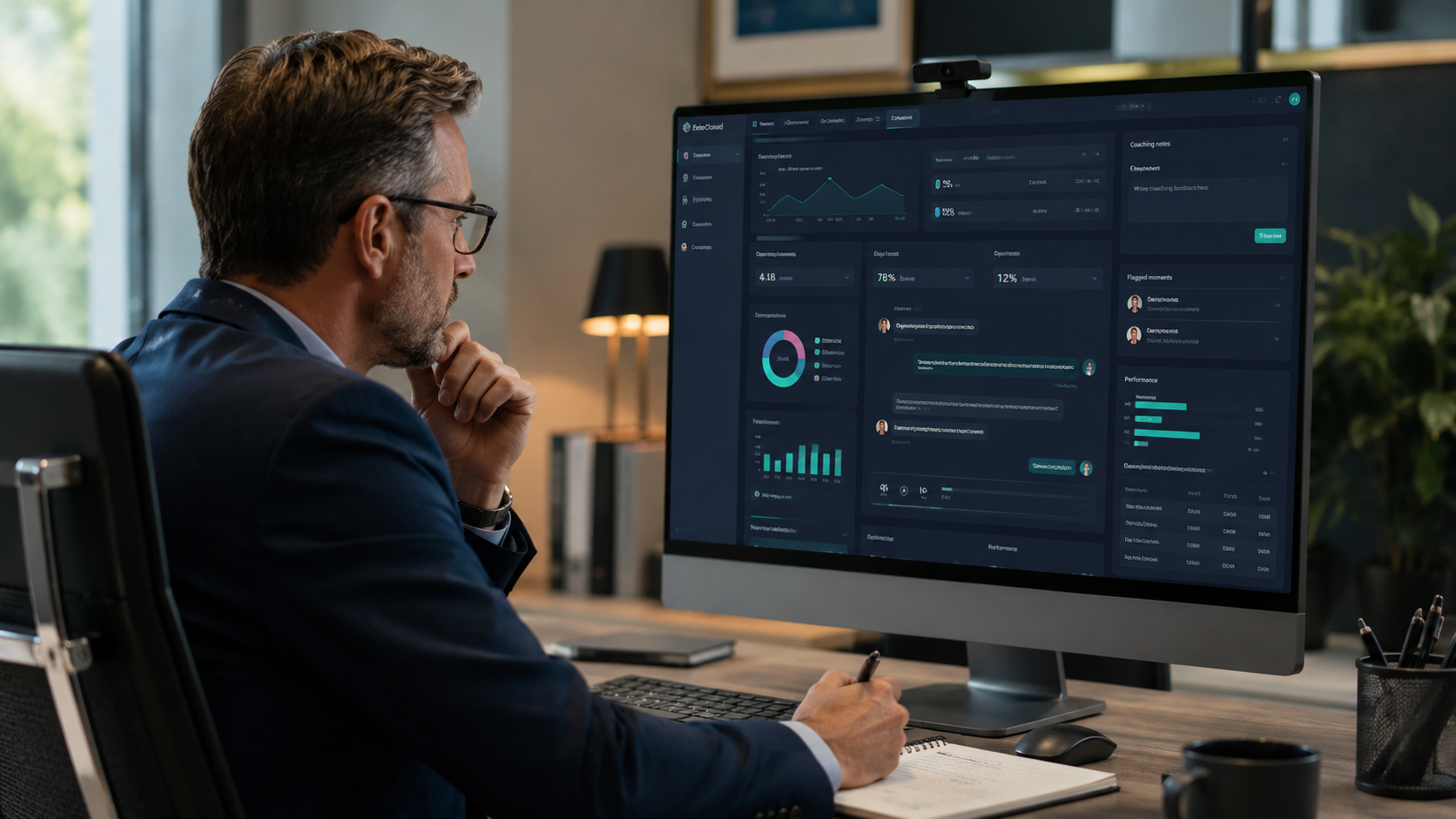
Conversational AI Insights gives managers a faster, fairer, and more specific way to coach their teams by turning every recorded call into an actionable data point. Instead of relying on memory, instinct, or the occasional call you happened to overhear, you coach from what actually happened.
For most managers, coaching a phone team is harder than it should be. You are handling a full workload, you cannot listen to every call, and when you do pull someone aside for feedback it is often based on a single interaction that may or may not reflect how they actually perform. That kind of coaching is well-intentioned but inconsistent, and inconsistent feedback is one of the main reasons front desk performance plateaus.
This article walks through how to use the Conversational AI Insights dashboard to build a coaching system that is grounded in data, fair to your team, and simple enough to actually use every week.
Why Is Phone Team Coaching So Inconsistent at Most Businesses?
The average manager reviews a small fraction of the calls their team handles. A few per week at best, often far fewer. Those reviews are usually triggered by something going wrong: a customer complaint, an overheard call that stood out, or a pattern that became impossible to ignore.
That means coaching is almost always reactive. Something bad has to happen before it surfaces as a conversation. And because the feedback is tied to a specific incident rather than a pattern, it can feel to the team member like they are being called out rather than supported.
The result is a team that receives inconsistent feedback, has no clear picture of where they stand, and watches the same issues recur because there is no structured follow-up to close the loop. The problem is not a lack of effort from managers. It is a lack of visibility into what is actually happening across all calls, not just the ones that get noticed.
 What Is the Conversational AI Insights Coaching Command Center?
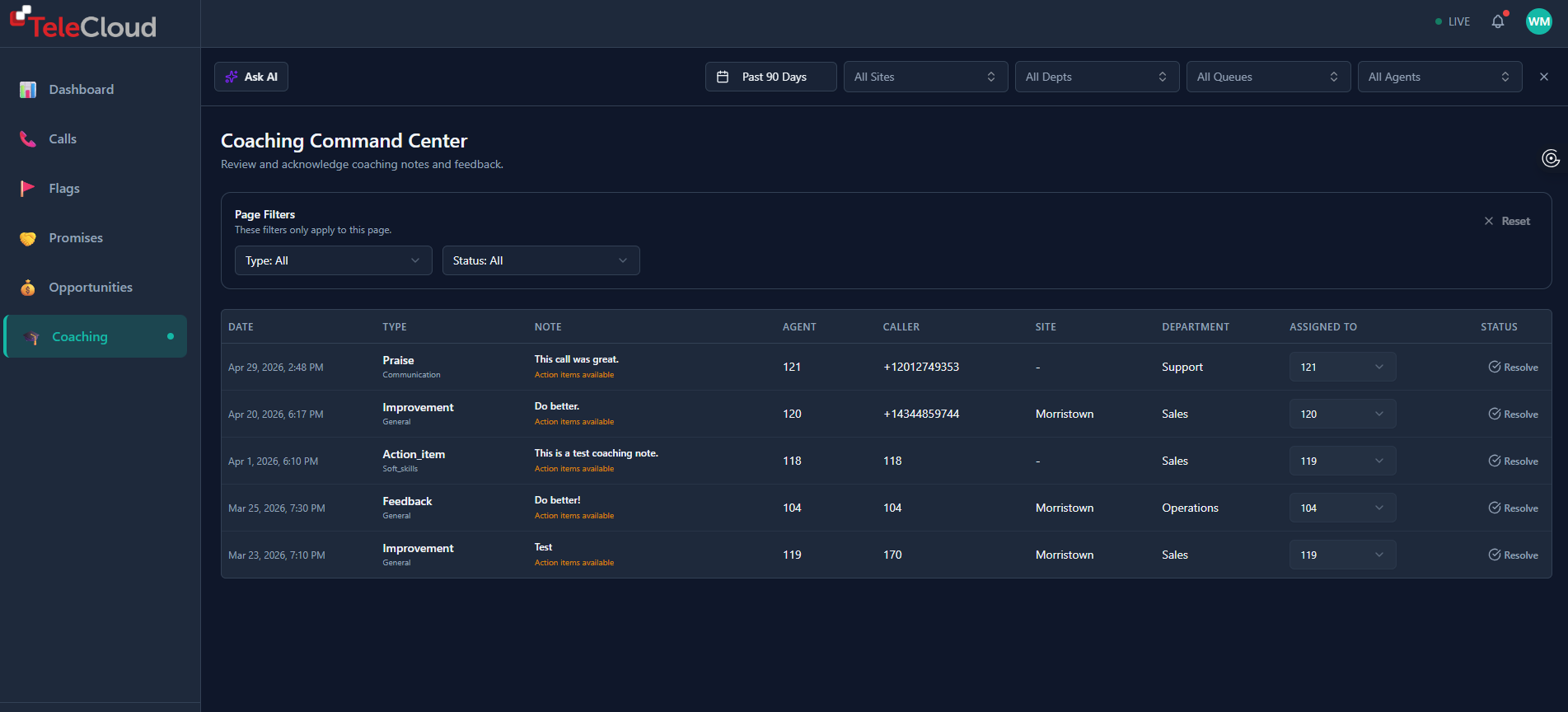
The Coaching Command Center is a dedicated view inside the Conversational AI Insights dashboard where managers can log, track, and follow up on coaching notes tied directly to individual calls.
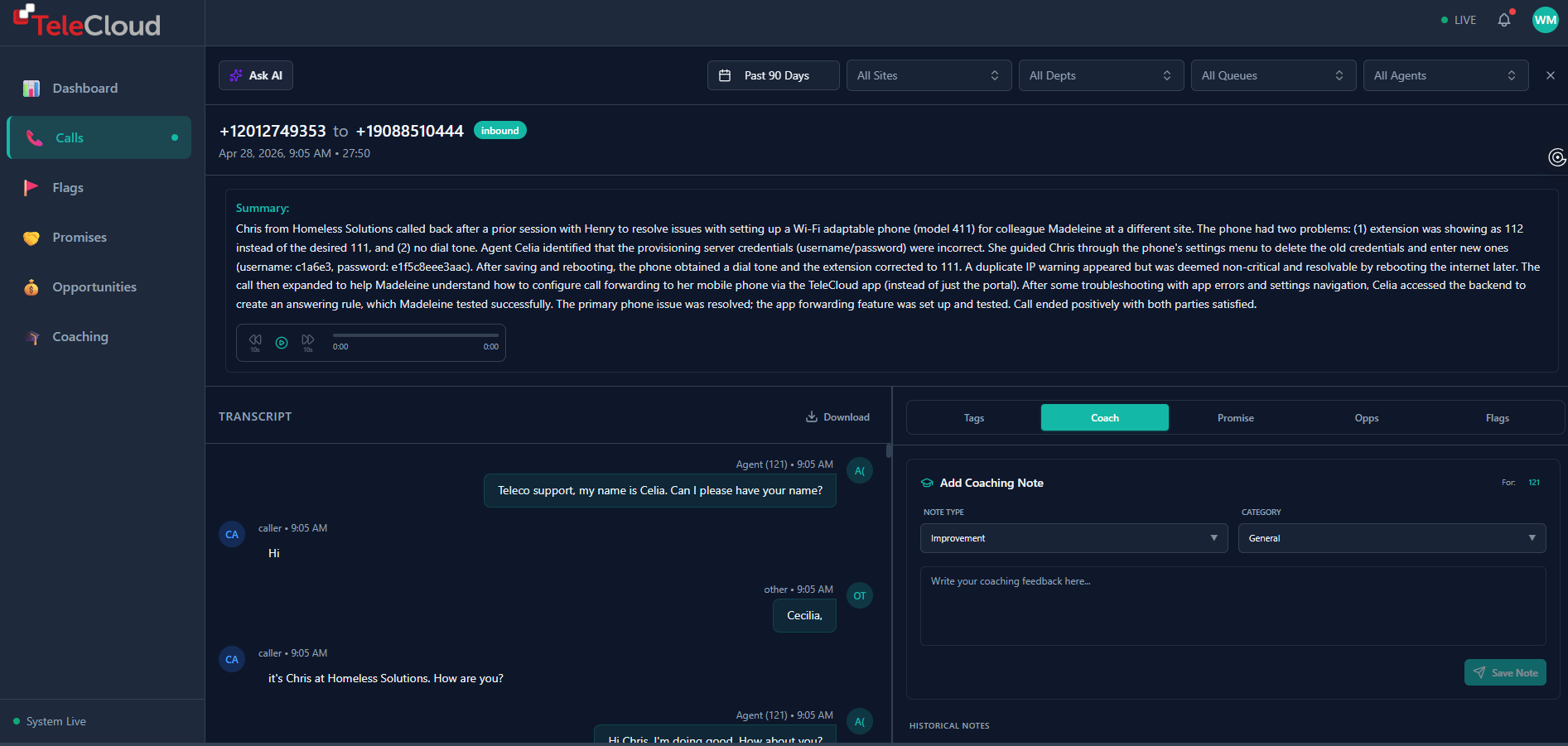
Every call your team handles is automatically transcribed and analyzed. From there, a manager can open any call, review the AI-generated summary and full transcript, and add a coaching note tied to that specific interaction. That note is assigned to an agent, categorized by type, and tracked until it is resolved.
Nothing falls through the cracks. No more hallway conversations that never get followed up on. No more feedback that lives in a manager's head and never gets communicated. Every coaching moment has a record, a status, and an owner.
 How Do You Use Call Transcripts and Summaries to Coach More Specifically?
One of the biggest challenges in coaching phone teams is specificity. Telling someone they need to handle difficult callers better is not useful feedback. Telling them exactly what happened at the three-minute mark of a specific call, and what a better response might have looked like, is.
The Conversational AI Insights dashboard makes that level of specificity possible without requiring a manager to sit through a full recording. Every call comes with an AI-generated summary that gives you the core of the conversation in a few sentences: what the caller needed, how the agent handled it, and how the call resolved.
If you need more detail, the full transcript is right there. You can read through the conversation, find the exact moment something went well or went sideways, and anchor your coaching note to that specific exchange. The agent knows exactly what you are referring to. The conversation starts from a shared reference point rather than a vague impression.
What Types of Coaching Notes Can You Leave in the Dashboard?
The Coaching Command Center supports four distinct note types, each serving a different purpose in a well-rounded coaching system.
|
Note Type |
When to Use It |
What It Accomplishes |
|
Praise |
When an agent handles something exceptionally well |
Reinforces the behavior so it gets repeated, not just the ones you correct |
|
Improvement |
When a specific behavior or pattern needs to change |
Flags a concrete area to work on, tied to a real call |
|
Action Item |
When a next step needs to be completed by the agent |
Creates accountability with a trackable task, not just a suggestion |
|
Feedback |
For general observations tied to a specific interaction |
Captures nuanced context that does not fit neatly into the other categories |
Each note is assigned to the agent on that call and tracked to resolution. When the behavior improves or the action item is completed, the manager marks it resolved. The agent gets visible credit for the growth. The manager has a record of the coaching history without needing to maintain a separate spreadsheet.
|
Want to see the Coaching Command Center in action? Schedule a demo with TeleCloud, and we will walk you through exactly how it works. |
How Do You Build a Coaching Cadence Using the Dashboard?
Having the tool is one thing. Building a rhythm around it is what makes it effective. Here is a standard cadence that works for most phone teams without adding significant time to a manager's plate.
- Monday: spend 20 to 30 minutes in the Coaching Command Center reviewing flagged calls and any open notes from the prior week. Close out anything that has been resolved and note any patterns you are seeing across multiple calls.
- Midweek: log new coaching notes as they come up. Do not wait for a weekly batch. If you read a summary that stands out, take two minutes to add a note while the context is fresh.
- End of week: check open action items. If an agent had a specific next step to complete, follow up before the week closes so nothing carries indefinitely.
- Monthly: pull back and look at trends. Are sentiment scores improving? Is a specific call type consistently generating low resolution rates? Monthly pattern reviews are where you make systemic decisions, not just individual ones.
- Run a baseline review first. Before logging any coaching notes, spend one session reviewing the last 30 days of calls and summaries. Get a sense of patterns before you focus on individuals.
- Identify two or three focus areas for the team, not ten. Trying to improve everything at once is a fast track to improving nothing. Pick the areas that will have the most impact and start there.
- Introduce the tool to your team before using it in reviews. Show them what the dashboard looks like, explain how you will use it, and make clear that praise is part of the process, not just improvement notes. Transparency removes the anxiety that comes with feeling monitored.
- Commit to closing loops. A coaching note that never gets resolved or followed up on erodes trust faster than no coaching at all. If you log it, follow through on it.
The goal is not to turn coaching into an administrative burden. It is to make coaching a consistent background habit rather than a reactive event.
How Does Data-Driven Coaching Change the Conversation With Your Team?
When coaching is grounded in data rather than impression, the dynamic of the conversation changes. The manager is not delivering a verdict. They are sharing something they noticed and asking what was happening on the other end.
That shift matters. Agents who feel like they are being evaluated based on one bad call that got overheard tend to get defensive. Agents who can see their own data, their sentiment trends, their resolution rates, their coaching history, and who receive feedback tied to specific documented interactions, tend to engage. They start asking questions. They start self-correcting before the manager has to say anything.
Over time, a team that coaches from data builds a shared language around performance. What does a good call look like? What does a difficult caller sound like, and how do we handle it? Those conversations become easier when everyone is looking at the same information.
Better Coaching Starts With Better Visibility
The best managers do not coach more often than everyone else. They coach more effectively. They know what to focus on, they deliver feedback that is specific enough to act on, and they follow up consistently enough that their team knows the feedback was real.
Conversational AI Insights gives you the visibility to do all three. Every call is reviewed automatically. Every coaching note is tracked. Every agent has a clear record of what they are working on and what they have improved.
Your team wants feedback. They just want it to be fair, specific, and consistent. The Coaching Command Center makes all three possible without adding hours to your week.
Frequently Asked Questions
What is the Conversational AI Insights Coaching Command Center?
The Coaching Command Center is a dedicated section of the Conversational AI Insights dashboard where managers can log coaching notes directly to individual calls, assign them to agents, categorize them by type, and track them through to resolution. It turns every recorded call into a potential coaching opportunity without requiring manual recording review.
What types of coaching notes can I leave on a call?
The dashboard supports four note types: Praise for recognizing strong performance, Improvement for flagging specific behaviors to work on, Action Item for assigning a concrete next step to the agent, and Feedback for general observations tied to a specific interaction. Each note is assigned to an agent and tracked until resolved.
Do agents see their own coaching notes?
Yes. Agents have visibility into their own coaching history within the dashboard. This transparency is intentional. When agents can see the same data their manager is looking at, coaching conversations become more collaborative and less evaluative, which leads to faster improvement.
How is AI call coaching different from traditional call monitoring?
Traditional call monitoring means manually selecting and listening to a small sample of calls, usually after something goes wrong. AI call coaching analyzes every call automatically and surfaces patterns across the full call volume. The difference is scale, consistency, and objectivity. You are not coaching based on the calls that happened to get selected. You are coaching based on what is actually happening across all interactions.
Does Conversational AI Insights work with my existing phone system?
Yes. Conversational AI Insights requires call transcriptions to function but does not require a TeleCloud phone system. Any business that can supply call transcriptions can use the platform. That said, businesses running on TeleCloud get the deepest integration, with call data, routing information, and insights all connected in one place.